


Madomi: Read & Translate Manga
3.610.00 Reviews
App Specs
- Version
- 1.1.14
- Updated On
- License
- Free
- Downloads
- 10,000+
- Developer
- Pawaka Labs
- Categories
- Comics
- Platform
- Android
Screenshots
 Analysis by AppCompare
I judge a manga translator less by how impressive it sounds than by whether it helps me keep reading when a page is outside my language comfort zone. Fakey - Manga Translator is built around a focused idea: use a phone camera to translate text in a manga image. That makes it more of a reading aid than a manga library, and that distinction matters. I’d reach for it when I already have a page in front of me and want help understanding it, not when I’m looking for a place to discover or collect comics.
A camera-first way through a language barrier
The appeal is the directness of the workflow. Rather than copying unfamiliar text into a separate translation app, the reader can point a phone at a panel and work from the page itself. For manga, where dialogue sits inside speech bubbles and alongside expressive artwork, that can feel more natural than switching repeatedly between a comic and a dictionary. The central promise is not that every nuance will be settled, but that a language gap need not end the reading session.
This approach is especially useful for short passages: a character’s reply, a sound effect, or a sign that changes the meaning of a scene. It can also help me decide whether I understand enough to continue before spending time looking up every word. I treat a machine translation as a clue to the scene, not a replacement for an editor’s translation or a language teacher’s explanation.
Making a scan easier to interpret
In practice, the image is part of the translation. A camera pointed at a clean, flat page gives the app a better chance than a dim shot, a curved book near the spine, or a panel filled with tiny lettering. I would hold the phone steady, keep the page evenly lit, and frame one useful area at a time instead of trying to capture a whole spread. Those small choices are practical ways to reduce avoidable recognition mistakes with any image-based reader.
When the result looks odd, I wouldn’t immediately assume the sentence itself is wrong. The app may have picked up a nearby bubble, missed a character, or struggled with stylized lettering. I’d compare the overlay with the original panel, then retake the image more closely if the text is important. That quick check is worthwhile for a punchline, a name, or a plot detail; for a minor aside, I might simply keep reading and use the surrounding story for context.
Where it fits beside other reading tools
Fakey sits in a different spot from a conventional manga reader. A reader app is usually the better choice for browsing a catalog, following a series, or enjoying a polished, professionally translated release. A general camera translator can be more flexible with signs, menus, and other everyday text, while a dictionary is better when I want to inspect a word closely. Fakey’s specific draw is the manga-page situation: it aims to make text in comic artwork easier to understand without turning the task into a string of manual lookups.
That focus comes with a trade-off. Translation over an image can help me follow a scene, but it cannot guarantee the same pacing, lettering choices, or careful localization I would get from an official edition. I’d use it as a bridge to a story I can’t otherwise read, or as a quick comprehension aid, rather than expecting it to recreate the work of a professional manga translator.
Worth Reading Before You Choose

Baby Panda World Brings Quick Play to Modern Phones, but Its Game Library Feels Busy

ESPN’s Live Game View Makes Following Close Games Easier

QuizzLand Review: A Good Fit for Short Trivia Breaks, Not Every Player

Basketball Stars: Multiplayer Is Fast, but Can It Recover When Matches Go Wrong?

WEBTOON Turns Phone Updates Into a Better Reading Routine

Link to Windows Runs on Shared Habits, Not Social Feeds
A realistic reading session
Imagine I’m reading a chapter during a quiet break and reach a page where an unfamiliar line seems to explain why a character has suddenly changed their mind. I can use the phone to inspect that panel, get a rough sense of the dialogue, and return to the page instead of opening several unrelated tools. If the wording still feels uncertain, I can check the surrounding exchange or revisit the panel. This is a modest convenience, but it can preserve the rhythm of reading when a single sentence would otherwise stop me.
For a long session, I’d be more selective. Translating every bubble could interrupt the artwork and make a chapter feel like a sequence of tasks. I’d reserve the app for the lines that carry important information, jokes I want to understand, or phrases I’m curious about. That selective workflow makes the camera approach feel like assistance rather than a demand to process every panel.
Who is most likely to benefit
I can see it suiting curious readers who already have manga images available and are comfortable treating translations as helpful approximations. It may also be useful for language learners who want to connect written text with visual context, provided they check uncertain wording rather than memorizing every output as definitive. If your main goal is to read a series smoothly in your preferred language, an official translation or a dedicated manga reader is likely to be more satisfying.
It is less appealing if you regularly read somewhere without a dependable internet connection, since the app’s translation process requires connectivity. It may also frustrate anyone who expects every decorative font, blurred image, or dense panel to be interpreted perfectly. I’d choose another tool for precise study of a tricky sentence, and I’d choose a standard reader for browsing and uninterrupted chapter reading.
Getting Started with Fakey
First off, installing Fakey - Manga Translator was a breeze. Available on both Android and iOS, it quickly found its way onto my home screen. The app has a sleek and intuitive interface, making it super easy to navigate even if you're not tech-savvy. A few taps and I was ready to start exploring its features.
How It Works
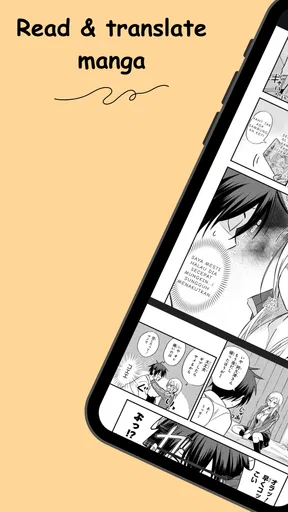
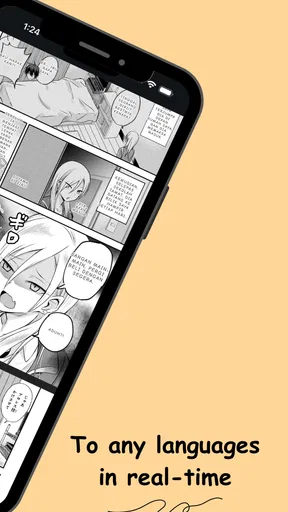
So, how does this app work its magic? Simple! You snap a picture of the manga panel you're reading—yes, even the ones with the most intricate kanji—and Fakey begins its translation wizardry. Within seconds, the app overlays translated text right onto the image. It's as if you're holding an English version in your hands. Pretty cool, right?
A Seamless Experience
One thing I loved about using Fakey was its seamless integration. The translations appear naturally on the page, and the font used is quite similar to what you'd expect in official manga translations. This attention to detail really enhances the reading experience. I found myself forgetting I was using an app at all!
Accuracy and Language Options
Translation accuracy is where Fakey truly shines. The app supports multiple languages, which is fantastic if you're into multilingual manga series. While testing, I found the translations to be surprisingly accurate, capturing nuances and context that are often lost in translation. It's not perfect, but it's pretty darn close.
User Interface and Features
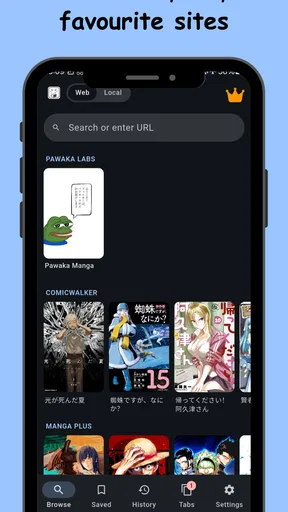
The user interface deserves a special mention here. It's clean, straightforward, and doesn't bombard you with unnecessary features. You get what you need without any fluff. There's also a handy history feature, so you can revisit your previous translations without having to re-scan the pages. Plus, the app is quick—no more waiting ages for translations to load.
That history can be handy when I want to compare a confusing line with the rest of a scene instead of repeating the scan immediately. I’d use it as a lightweight reference, especially if I’m checking a character name or returning to a panel after reading further. It does not change the need to judge the result in context, but it can make a stop-and-start reading session less tedious.
What Could Be Better?
Now, no app is without its flaws, and Fakey - Manga Translator is no exception. Occasionally, I ran into hiccups with less common fonts or when images were slightly blurred. While these instances were rare, they did remind me that the app, like any tech, isn't infallible.
Those edge cases matter more in manga than they might in ordinary printed text. A handwritten effect, tightly packed speech bubbles, or a line that overlaps artwork can make it harder to tell whether the app recognized the right words. When the translation seems out of character, I’d check the original image and nearby dialogue before drawing a conclusion about the story. The artwork supplies context, but it can also make the text harder to isolate.
Another small gripe is the lack of offline functionality. As it stands, you need an internet connection for the app to work its magic. This might be a downside if you're often reading on the go without reliable internet access.
That connection requirement is worth considering before a commute, a trip, or a reading spot with patchy service. I wouldn’t plan on it as my only way to understand a chapter in those circumstances. If I know I’ll be offline, I’d pick a translated edition or another reading option that works for that situation rather than counting on a fresh scan to be available.
Price, expectations, and a sensible test
The app is free to install, while optional in-app purchases range from $7.99 to $79.99 per item. I’d try the basic experience with a few representative pages before deciding whether any paid option suits my habits. In particular, I’d test a clean dialogue panel, a page with smaller text, and a stylized one. That gives a more useful sense of whether its camera-based approach fits the manga I actually read than judging it from a single easy scan.
It is rated for Everyone, and Pawaka Labs is the developer. The current release is version 1.0.22, with Android 7.0 as the minimum operating system requirement. Those details make it straightforward to check whether an Android device is compatible; readers on iOS can find it there as well. I’d still make my decision based on how often I need on-page translation, not on the idea that every manga session will be transformed.
What the reception suggests
Fakey has a 3.2 average from 115 ratings, with 10K+ installs and 6 written reviews. I read that as a reason to keep expectations measured: there is clear interest in the idea, but a modest average is a reminder that a focused tool can still be hit-or-miss for different readers and source images. The most helpful test is personal—try the kinds of panels that usually slow you down and see whether the output is useful enough to keep you in the story.
I’d also think about what “useful” means before relying on any translation. If I only need the gist of a conversation, a readable approximation may be enough. If I’m studying grammar, checking a subtle joke, or trying to understand an important plot reveal precisely, I’d compare another translation or consult a trusted language resource. The app is at its best when it removes friction, not when it is asked to settle every linguistic question.
Final Thoughts
All things considered, Fakey - Manga Translator is a game-changer for manga enthusiasts who want to break down language barriers. It's easy to use, impressively accurate, and genuinely enhances the reading experience. While there are a few minor drawbacks, they're easily overshadowed by the app's benefits.
If you're tired of waiting for official translations or just want to explore new series in their original form, give Fakey a try. It's like having your own personal translator right in your pocket. Happy reading!
My recommendation in brief
I’d recommend it to someone who already has manga to read, wants quick help with unfamiliar dialogue, and understands that a camera translation is an aid rather than a definitive edition. I’d skip it as a primary reader if I need offline access, polished localization, or dependable word-by-word study. Used selectively—with clear images and a quick check of lines that affect the story—it has a practical role in a manga reader’s toolkit.
Pros
- Fast and accurate manga translations.
- Supports multiple languages seamlessly.
- User-friendly interface for easy navigation.
- Offline mode for reading without internet.
- Regular updates with new features.
Cons
- Occasional ads can disrupt reading.
- Limited customization options.
- Requires stable internet for best performance.
- Some translations may lack context.
- Premium features are behind a paywall.
FAQs for Madomi: Read & Translate Manga
What is Fakey - Manga Translator and how does it work?
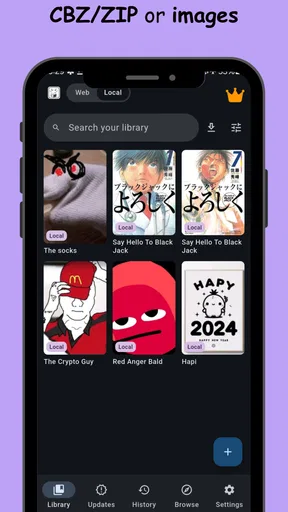
Fakey - Manga Translator is an app designed to translate manga text from various languages into your preferred language. It uses advanced OCR (Optical Character Recognition) technology to detect and translate text directly from manga images. Simply upload an image or take a photo of a manga page, and the app will provide a translated version of the text.
Is Fakey - Manga Translator free to use?
Fakey offers a free version with basic features and limited translations per day. For users needing more extensive use, a premium subscription is available, which provides unlimited translations, enhanced text recognition, and ad-free experience. Pricing details can be found in the app's settings under the subscription section.
Which languages does Fakey - Manga Translator support?
The app supports a wide range of languages, including Japanese, Korean, Chinese, and more, translating them into English and other major languages. The app continually updates to include more languages, enhancing its accessibility for global users. Check the app's language settings for the most current list of supported languages.
What are the main features of Fakey - Manga Translator?
Key features include high-accuracy OCR technology, a user-friendly interface, real-time translation, and the ability to save translated pages for offline viewing. Additionally, the app offers customization options, such as changing the font size and style for better readability. Premium users also enjoy enhanced speed and accuracy.
Are there any limitations to using Fakey - Manga Translator?
While Fakey is highly effective, it may struggle with highly stylized fonts or complex layouts. Additionally, the free version limits the number of translations per day, which might not suffice for avid readers. Users may also encounter occasional inaccuracies depending on the quality of the original manga image.


